
04.7.1 / CDS User Guide
Video archive
historical reference only.
Archived September 10, 2026. These older screenshots and instructions do not represent the current release. The original pilot is an interactive slide guide, not a recorded video.
06.1 Manuals · read online, preview or download →
Current Workbench, reference editions and downloads
Use the online User Guide for current controls, the released model directory for selectable models and compatibility, and the Training Manual for connected exercises. Wider theory references do not mean every formulation is enabled in Workbench.
Screenshots and download editions carry revision dates; consult the current chapter for updated Workbench instructions. Find the overview PDF, guides and exercise databases in Your CDS library.
← Current video status · Use the current exercise manual
Archived pilot · Historical interactive walkthrough
Compare materials and build an Ashby view
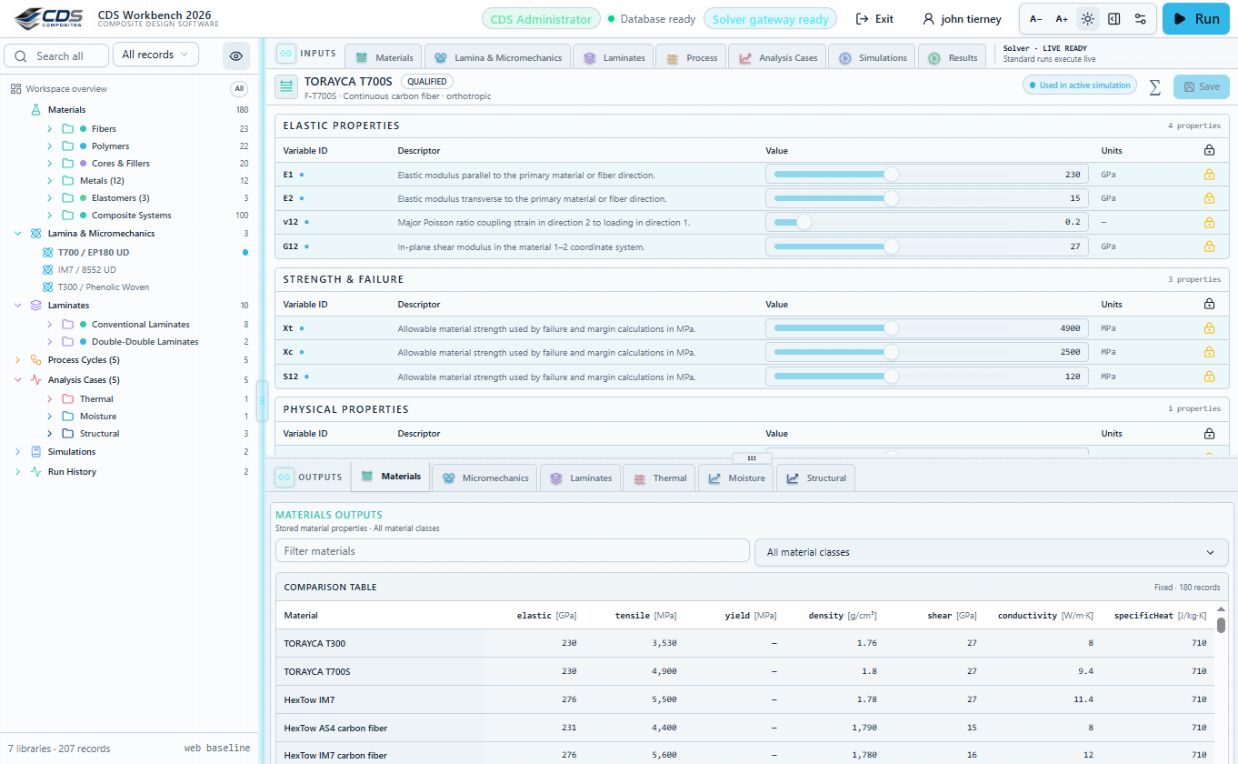
Open Materials and confirm the database and solver indicators. Inputs remain above the divider; the Materials comparison table and chart remain available below it.
Read transcript and verification notes
1. Orient the workspace
Open Materials and confirm the database and solver indicators. Inputs remain above the divider; the Materials comparison table and chart remain available below it.
Verify: Confirm the Workbench mode and database source before interpreting stored properties.
2. Plot a material class
Select the Fibers class in the project tree. The comparison table is fixed on the left and the chart defaults to an Ashby view of the selected class.
Verify: The output header should read Fibers and the record count should reflect the entire class.
3. Compare two records
Select TORAYCA T700S, then Shift-click HexTow IM7. Material names become columns and property IDs become rows so values, units, identity, and provenance can be compared directly.
Verify: Verify both record names, manufacturer fields, record revisions, and primary sources before comparing values.
4. Read the Ashby plot
Read elastic modulus on the horizontal axis in gigapascals and tensile strength on the vertical axis in megapascals. The selected records stay synchronized between the table and chart.
Verify: Ellipses summarize class spread and orientation; they are comparison aids, not design allowables or qualification limits.
138 exercises, examples and case studies → · Your CDS library: overview, manuals and database downloads →