
Not every laminate needs a micromechanics calculation. This exercise helps you read a stored material or mixed-source stack correctly, tracing each ply back to the properties it actually uses. The distinction matters when historical records, measured properties and calculated Micro recipes appear in the same workspace.
Open this exercise in Workbench
Prepare the baseline
Follow the material reference for each ply and inspect its units, status and source before running. For converted records, distinguish the original data from any teaching loads added during conversion. Establish the baseline response first, then make the comparison specified below without also changing unrelated material properties or boundary conditions.
Worked procedure
1. Follow the laminate’s ply references to the stored material records and inspect the properties resolved for each ply. This example deliberately uses stored values without a Micro calculation, so the absence of that connection is not a missing setup step. Record the source and units of the stored properties before interpreting the response.
2. Run the stored-material laminate and retain its stiffness and response outputs. Then open example 01 and identify the actual differences in its property source and setup before comparing the results. A difference between the runs should be explained from those inputs, rather than attributed to the record name alone.
Review checkpoints
The material-to-laminate path bypasses Micro.
Changing a stored modulus changes the next Run, not another example.
Model limits
Stored representative lamina properties, not a solved Micro recipe or qualified design allowables.
Interpret the comparison
Use stiffness, strain, curvature and ply-stress outputs together to explain the load response. Where the task doubles a resultant, compare the resulting change with the stated linear model and unchanged reference state. Do not infer missing strengths, a progressive loading history or validation evidence from the presence of an older source file.
How information passes between models
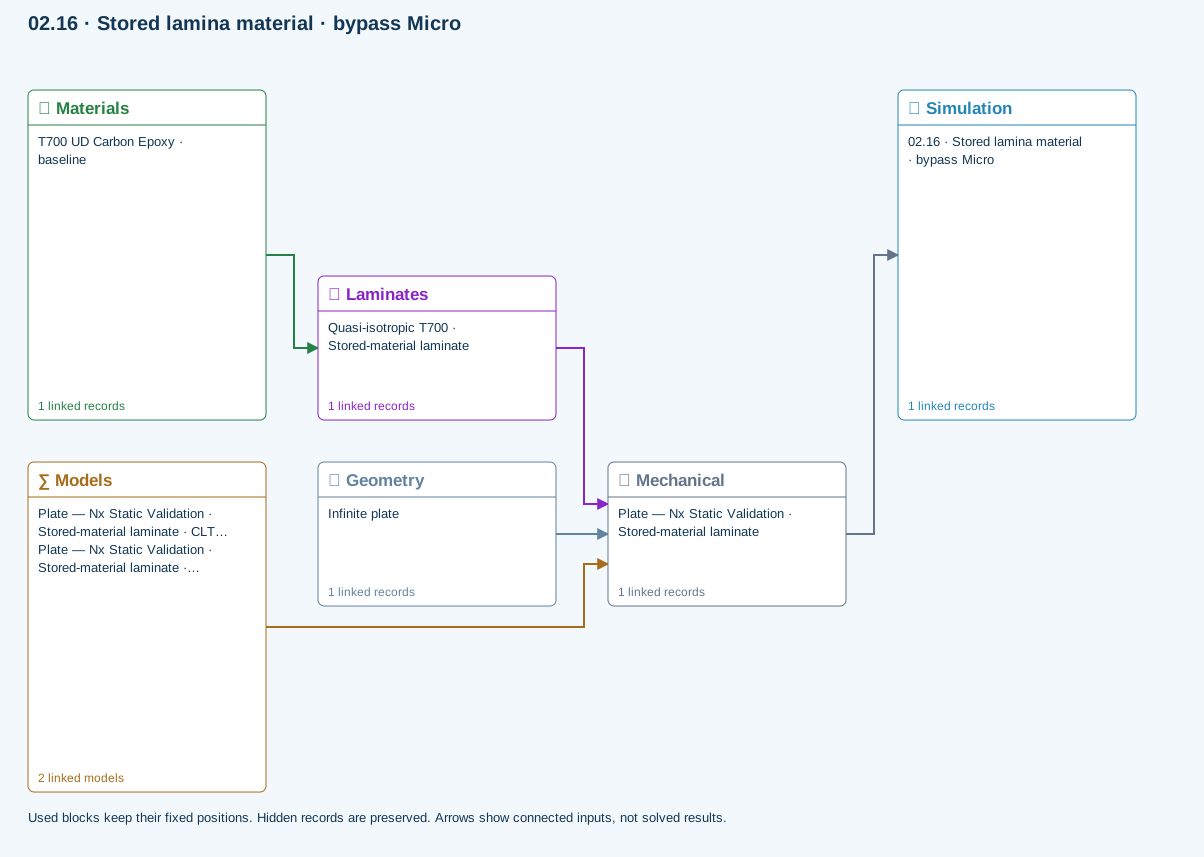
Materials → Laminates: Stored ply stiffness, strength, density and expansion properties.
Mechanical → Simulation: SIMULATION selects this case and its analysis model; the case owns its applicable cycle and input references.
Laminates → Mechanical: Ply angles and thicknesses, stiffness, mass and ply properties.
Geometry → Mechanical: Part shape and dimensions, thickness or section definition, and model-specific geometric inputs. Each selected case consumes only the dimensions its model supports.
Models → Mechanical: Applied model assignment: CLT · Linear static with failure indices. Model parameters and formulation are used by Mechanical.; Maximum stress
Further reading and evidence
- Connect a simulation
- Edit laminate materials, angles and thicknesses
- Run and review a model
- Connected inputs and result freshness
- Related case study: NASA laminate design
Review the recorded validation scope. Retain the original inputs and solver notices with the results. Representative teaching data are not design allowables.
References and source sections
References are retained with the formulations they support. Software instructions describe implementation scope; a cited source does not establish independent validation of a CDS calculation.