
An optimization study is a structured comparison within a stated set of choices and constraints. This exercise teaches you to define that comparison, inspect which candidates are feasible and preserve the search settings so that the selected result can be understood and reproduced.
Open this exercise in Workbench
Prepare the baseline
Run or inspect the baseline first, then enter the objective, bounds, constraints and sampling or search controls exactly as specified. Record the seed where one is provided. Keep infeasible outcomes visible: they help explain the constraints and should not be silently discarded or treated as a solver success.
Worked procedure
1. Inspect the 64-ply symmetric starting laminate with 0.125 mm plies; confirm total thickness 8 mm. Run the baseline mechanical case.
2. Open Optimize → Laminate, select this structural case and choose maximum strength with the current 64 plies fixed. Use angles −45, 0, 45 and 90°, symmetry and balance, minimum angle content 0%, Maximum stress and required load factor 1.
3. Use budget 800 and seed 42. Record best feasible candidate, convergence and governing ply; repeat with seed 43 and compare. A budget-limited search is not a global optimum.
4. Save the optimization snapshot. Create the candidate laminate separately, rerun structural analysis and compare baseline/candidate mass, stiffness and failure index.
Review checkpoints
The initial stack contains exactly 64 active plies. The released search supports at most 64 plies.
Reject infeasible candidates; validate any improved design outside the optimization search.
Classical laminate first-ply screening does not establish delamination, buckling, fatigue or manufacturing suitability.
Model limits
Guided optimization case study using shared database records. Configure the documented search in Optimize, then save its results and inputs. No precomputed optimum or benchmark-validation claim. ASTM-based teaching geometry, not certification. Grips, tabs, alignment and physical test validity are not simulated.
Interpret the comparison
Describe the best feasible candidate found within this search, not an unqualified global optimum. Inspect neighbouring samples or repeat the stated search comparison where requested, then create and rerun the candidate in the relevant analysis. A saved optimization snapshot and a newly evaluated design are separate pieces of evidence.
How information passes between models
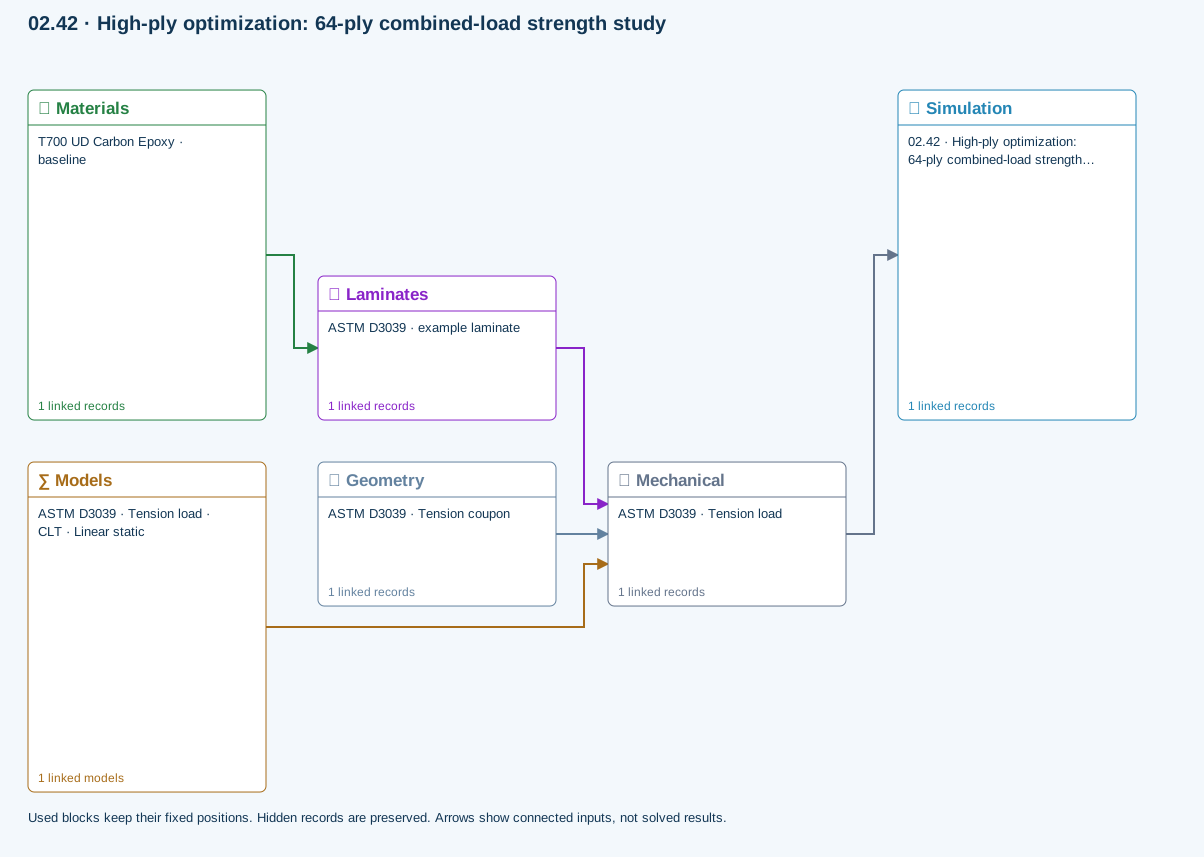
Materials → Laminates: Stored ply stiffness, strength, density and expansion properties.
Mechanical → Simulation: SIMULATION selects this case and its analysis model; the case owns its applicable cycle and input references.
Laminates → Mechanical: Ply angles and thicknesses, stiffness, mass and ply properties.
Geometry → Mechanical: Part shape and dimensions, thickness or section definition, and model-specific geometric inputs. Each selected case consumes only the dimensions its model supports.
Models → Mechanical: Applied model assignment: CLT · Linear static. Model parameters and formulation are used by Mechanical.
Further reading and evidence
- Edit laminate materials, angles and thicknesses
- Run and review a model
- Optimization cases: complete inputs and guided studies
- Connected inputs and result freshness
- Geometry, loading and virtual tests
Review the recorded validation scope. Retain the original inputs and solver notices with the results. Representative teaching data are not design allowables.
References and source sections
References are retained with the formulations they support. Software instructions describe implementation scope; a cited source does not establish independent validation of a CDS calculation.