
The virtual test exercise connects a specimen-level analytical study to a linked laminate and a stated parameter set. Its educational purpose is to make the relationship between inputs, response curves and measured calibration visible, not to replace a laboratory test or demonstrate compliance with a standard.
Illustrative calibration only. Start with a 16-ply cross-ply reference laminate; this is a separate, reference-state study.
Open this exercise in Workbench
Prepare the baseline
Read the selected model’s scope before interpreting its title. Identify which values come from the laminate and which are independent specimen or measured calibration inputs. Establish the supplied case, then vary one editable study parameter while preserving the remaining assumptions; retain the units and parameter values with both curves.
Worked procedure
1. Follow the study’s laminate link and inspect the stack and resolved properties that it will use. Then read the model scope and identify the additional specimen, loading or calibration inputs belonging to this separate study. Record which values are supplied independently rather than assuming that every required quantity is inherited from the laminate.
2. Run the supplied study as a baseline and inspect the complete response curves, including their axes, units and parameter settings. Retain the numerical values or a clearly labelled capture before changing an input. Use the interpretation guidance below and the linked formulation to identify what each curve represents and which conclusions remain outside its scope.
3. Choose one editable parameter that belongs to this model and record its original and revised values. Keep the other inputs fixed, rerun the study, and compare the same output quantities over the same range. Explain the observed change using the linked formulation, including a discussion of whether the comparison stays within the model’s calibration and assumptions.
Review checkpoints
Do not interpret example calibration values as material allowables.
Record the assumptions and distinguish analytical verification from experimental validation.
Model limits
Uniform nominal shear between notches using linked laminate Gxy and thickness. Not a notch/fixture stress field or nonlinear shear solution. Gauge length is the effective shear deformation length, not crosshead travel.
Interpret the comparison
Explain the trend using the formulation and identify which parts of the physical test are outside the numerical model. Where strength, toughness or empirical retention is supplied as an input, do not present it as an independently predicted output. Your conclusion should distinguish a useful teaching calculation from experimental validation.
How information passes between models
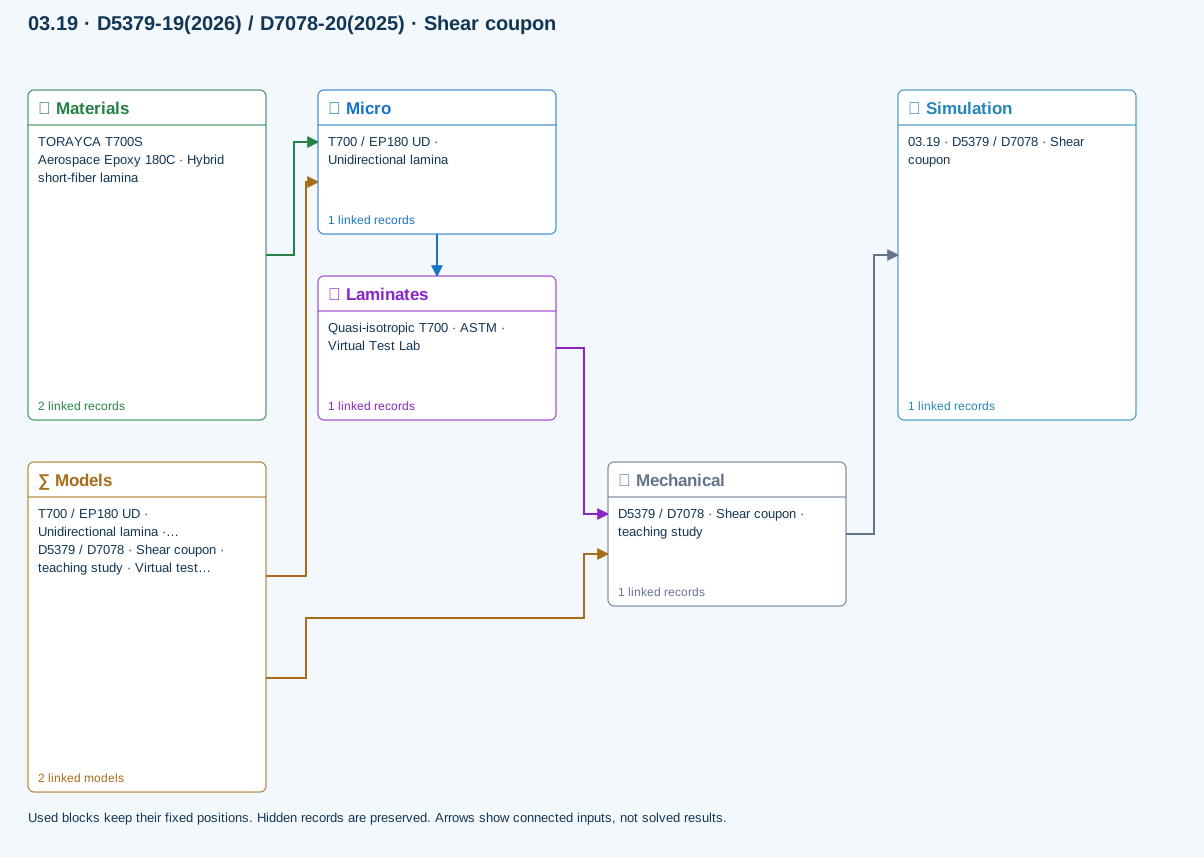
Micro → Laminates: Predicted ply stiffness, strength, density and expansion properties.
Materials → Micro: Constituent stiffness, strength, density and thermal / moisture properties.
Mechanical → Simulation: SIMULATION selects this case and its analysis model; the case owns its applicable cycle and input references.
Laminates → Mechanical: Ply angles and thicknesses, stiffness, mass and ply properties.
Models → Micro: Applied model assignment: Halpin–Tsai. Model parameters and formulation are used by Micro.
Models → Mechanical: Applied model assignment: Virtual test · nominal shear coupon. Model parameters and formulation are used by Mechanical.
Further reading and evidence
- ASTM Virtual Test Lab: equations and limits
- Edit laminate materials, angles and thicknesses
- Run and review a model
- Connected inputs and result freshness
Review the recorded validation scope. Retain the original inputs and solver notices with the results. Representative teaching data are not design allowables.
References and source sections
References are retained with the formulations they support. Software instructions describe implementation scope; a cited source does not establish independent validation of a CDS calculation.